

About
SpeakThat (styled as “SPEAKTHAT!”) is an open-source Android application that reads incoming notifications out loud using Android’s text-to-speech (TTS) engine. It was designed to continue the legacy of older notification reading applications, mainly Touchless Notifications developed by DYNA Logix in the mid-2010s.
SpeakThat differs from other notification readers in its customization and user interface. Some notifications contain information that you would rather not be made public. SpeakThat allows you to control exactly what gets read out, and when. You can decide what apps get their notifications read out, set up words that prevent readouts, enable private mode for certain notifications, add cooldown periods to prevent spam, and just about anything else you could want. While plenty of notification readers feature adverts or in-app purchases, SpeakThat offers all of its features for free. No ads, no paying for extra readouts, and absolutely no subscriptions. SpeakThat is open-source under the GPL-3.0 license, giving you permission to use it, modify it, and share it provided any derivatives are under the same license and its original copyright holder, Mitchell “mitchib1440” Bell, is attributed.
Backstory
Hi! I’m Mitchi. I started creating SpeakThat in early July, 2025 after a colleague was showing me the latest developments in AI-accelerated programming. I was very reluctant, but decided it was time to give it a shot with a project I had wanted to do for many years. You see, I have been using notification readers for almost as long as I have used smartphones. On my first proper smartphone, I had been using Utter!, created by Ben Randall. It wasn’t a notification reader but rather a voice assistant (think Google Assistant or Siri… but more advanced by over 10 years) One of its many features was that it could read notifications out loud using the text-to-speech service it already relied on. While it didn't offer as many options as modern readers do, it showed me how great it was to have a phone read notifications. My eyes felt more free, not being forced to look at what was a very small screen to see very small announcements.
Utter! soon got replaced by Saiy, which was a ground-up re-write and open-source to boot! The issue with both of these, however, was that they were fundamentally NOT notification readers. It was just a neat feature they had. And as it wasn't the primary focus of the app, they didn't get many new features. And out of curiosity I decided to see what was available if I searched for dedicated notification reader apps.
That's when I came across Touchless Notifications, created by DYNA Logix. This was everything I had wanted and more. It had genuinely useful features, such as shake-to-stop, word filters, pronunciation correction, and a comprehensive triggers system similar to what is possible with MacroDroid or Tasker. I used Touchless Notifications, specifically the Pro version, very happily for many years.
I noticed, however, that some time in 2019 it appeared to have been removed from the Play Store. I asked the creator what had happened and he explained to me that the app had been unfairly removed by Google for having more than one app shortcut - one for the app settings UI, and another to launch its “Summary” feature. And despite this being a rule that didn't seem to be enforced for anyone else, and potentially didn't even exist, DYNA Logix decided to not fight it as he had other apps on the Play Store and didn't want to risk angering Google. He recommended that I download an APK extractor and save the package file for Touchless Notifications Pro so I could continue to use it on my future devices. And that's what I did for the next 6 years.
Fast forward to 2025 and it's quite clear that Touchless Notifications was designed for an older version of Android. Unlike Utter!, it still works okay. But I had a feeling that may not be for long. And modern Android had introduced some annoying bugs that definitely weren't going to be fixed half a decade after the final update was released. The writing was most certainly on the wall.
I had a look at what was available on the market and wasn’t really all that satisfied. Touchless Notifications had spoiled me with its vast feature set. Some of the other apps on the market were very close to what I wanted, but none had the full suite of features I wanted. And many of the apps were either poorly designed, had intrusive ads, or had awkward paid elements.
So, I decided to make my own. I had this idea for a while, however coding is not an easy thing to get into. But with the help of AI-assisted coding (and a brief attempt at creating basic Android apps back in 2018), it becomes a very feasible dream. And so after a few failed versions, I'm pleased to introduce SpeakThat! The most comprehensive notification reader making use of my now 12+ years of user testing similar apps.
Acknowledgments
As I mentioned in the Backstory, SpeakThat was mostly inspired by Touchless Notifications by Greg (DYNA Logix). Without his original app, I may have never fallen in love with notification readers and SpeakThat would simply not exist. Thank you ever so much for creating something truly ahead of its time. And I’m sorry it received such unfair punishment from Google!SpeakThat uses many icons from the Material Icons library. These are available under the Apache 2.0 license, and make SpeakThat look much more professional than it has any right to be! So a huge thank you to the Material design teams.
The SpeakThat wordmark and general branding uses the Roboto and Roboto Condensed fonts. These are licensed under the SIL Open Font License Version 1.1.
I should also thank the people making improvements in AI-assisted programming. SpeakThat simply couldn’t exist in its current form without this technology. I do my best to vet all code that gets released, but it’s not often that I have to re-do something. I’ve personally been using Cursor for my use, and they have improved their software massively since I started using it.
Thanks also to the Android development teams for making an operating system capable of working for everyone. Your work is greatly underappreciated!
Special thanks to my Mum, who supported the project from the very beginning and was willing to help me test it by trialling it on her phone! Thanks, Rusty!
I’d also like to thank my work colleagues, especially Connagh, who convinced me to try AI-assisted programming as I was very hesitant at first!
As this is the first time I had ever attempted anything like this, I ended up checking some of my basic notification reading and audio processing code to that of Voice Notify, created by Pilot51. I didn’t take any code directly, but since a lot of users were telling me certain things were working with Voice Notify but not with SpeakThat, its publicly-accessible code was incredibly helpful in making sure I wasn’t taking the wrong path. So massive thanks to Pilot51.
Thank you to all of the contributors, of which there are far too many to list at this point. But whether you contributed translations, code, donations, or even just constructive criticism, thank you so much. You shaped SpeakThat into something that truly helps people.
SpeakThat! & AI Usage
As the world heavily pivots towards artificial intelligence, I believe transparency with how work was created is more important than ever before.
SpeakThat’s code heavily makes use of AI-assisted programming. While I do my best to vet code used in the project and of course test new versions of the app on both my own devices as well as emulated devices before any of it goes public, I myself am not fluent in programming and development, and so there always exists the possibility for errors and faults to slip through into release. As you should expect, I take full responsibility for these mistakes and ask for your understanding as I work through them. If you are more talented than me (admittedly not a huge achievement!), please help the project by contributing to its source code while documenting your changes! If you’re not a programmer, you can still help the project by reporting bugs you find in the app.
I should state, however, that absolutely zero graphical work used by/for SpeakThat was generated by artificial intelligence. All visuals (Including logos, banners, and header images, and the project’s website) are all my own work, created using manual tools in Figma.
SpeakThat’s documentation was also written by myself, using LibreOffice Writer.
That said, I have used artificial intelligence to refine my wording in some areas for better clarity (and because I’m not all that great with technical explanations).
I greatly value the human experience of creation and thus only use AI as assistive tool, making sure my usage is both ethical and transparent. It does not run the project or make executive decisions.
Legalities
SpeakThat! is free and open-source software, released under the GNU GPL v3.0, a copyleft license that ensures modified and redistributed versions remain free and properly attributed.
This license allows you to download, modify, and redistribute SpeakThat, provided that any redistributed or modified versions remain under the same license and retain the original copyright notices.
As SpeakThat is a registered trademark, any derivatives should be rebranded to prevent confusion with the official project. This is to protect the original work from theft, and to protect users from using illegitimate or dangerous versions of SpeakThat. Unfortunately, FOSS projects are often targeted by attackers to exploit user’s existing trust.
SpeakThat! Copyright © Mitchell Bell
SPEAKTHAT is a registered trademark of Mitchell Bell

About
SpeakThat (styled as “SPEAKTHAT!”) is an open-source Android application that reads incoming notifications out loud using Android’s text-to-speech (TTS) engine. It was designed to continue the legacy of older notification reading applications, mainly Touchless Notifications developed by DYNA Logix in the mid-2010s.
SpeakThat differs from other notification readers in its customization and user interface. Some notifications contain information that you would rather not be made public. SpeakThat allows you to control exactly what gets read out, and when. You can decide what apps get their notifications read out, set up words that prevent readouts, enable private mode for certain notifications, add cooldown periods to prevent spam, and just about anything else you could want. While plenty of notification readers feature adverts or in-app purchases, SpeakThat offers all of its features for free. No ads, no paying for extra readouts, and absolutely no subscriptions. SpeakThat is open-source under the GPL-3.0 license, giving you permission to use it, modify it, and share it provided any derivatives are under the same license and its original copyright holder, Mitchell “mitchib1440” Bell, is attributed.
Backstory
Hi! I’m Mitchi. I started creating SpeakThat in early July, 2025 after a colleague was showing me the latest developments in AI-accelerated programming. I was very reluctant, but decided it was time to give it a shot with a project I had wanted to do for many years. You see, I have been using notification readers for almost as long as I have used smartphones. On my first proper smartphone, I had been using Utter!, created by Ben Randall. It wasn’t a notification reader but rather a voice assistant (think Google Assistant or Siri… but more advanced by over 10 years) One of its many features was that it could read notifications out loud using the text-to-speech service it already relied on. While it didn't offer as many options as modern readers do, it showed me how great it was to have a phone read notifications. My eyes felt more free, not being forced to look at what was a very small screen to see very small announcements.
Utter! soon got replaced by Saiy, which was a ground-up re-write and open-source to boot! The issue with both of these, however, was that they were fundamentally NOT notification readers. It was just a neat feature they had. And as it wasn't the primary focus of the app, they didn't get many new features. And out of curiosity I decided to see what was available if I searched for dedicated notification reader apps.
That's when I came across Touchless Notifications, created by DYNA Logix. This was everything I had wanted and more. It had genuinely useful features, such as shake-to-stop, word filters, pronunciation correction, and a comprehensive triggers system similar to what is possible with MacroDroid or Tasker. I used Touchless Notifications, specifically the Pro version, very happily for many years.
I noticed, however, that some time in 2019 it appeared to have been removed from the Play Store. I asked the creator what had happened and he explained to me that the app had been unfairly removed by Google for having more than one app shortcut - one for the app settings UI, and another to launch its “Summary” feature. And despite this being a rule that didn't seem to be enforced for anyone else, and potentially didn't even exist, DYNA Logix decided to not fight it as he had other apps on the Play Store and didn't want to risk angering Google. He recommended that I download an APK extractor and save the package file for Touchless Notifications Pro so I could continue to use it on my future devices. And that's what I did for the next 6 years.
Fast forward to 2025 and it's quite clear that Touchless Notifications was designed for an older version of Android. Unlike Utter!, it still works okay. But I had a feeling that may not be for long. And modern Android had introduced some annoying bugs that definitely weren't going to be fixed half a decade after the final update was released. The writing was on the wall, as they say.
I had a look at what was available on the market and wasn’t really all that satisfied. Touchless Notifications had spoiled me with its vast feature set. Some of the other apps on the market were very close to what I wanted, but none had the full suite of features I wanted. And many of the apps were either poorly designed, had intrusive ads, or had awkward paid elements.
So, I decided to make my own. I had this idea for a while, however coding is not an easy thing to get into. But with the help of AI-assisted coding (and a brief attempt at creating basic Android apps back in 2018), it becomes a very feasible dream. And so after a few failed versions, I'm pleased to introduce SpeakThat! The most comprehensive notification reader making use of my now 12+ years of user testing similar apps.
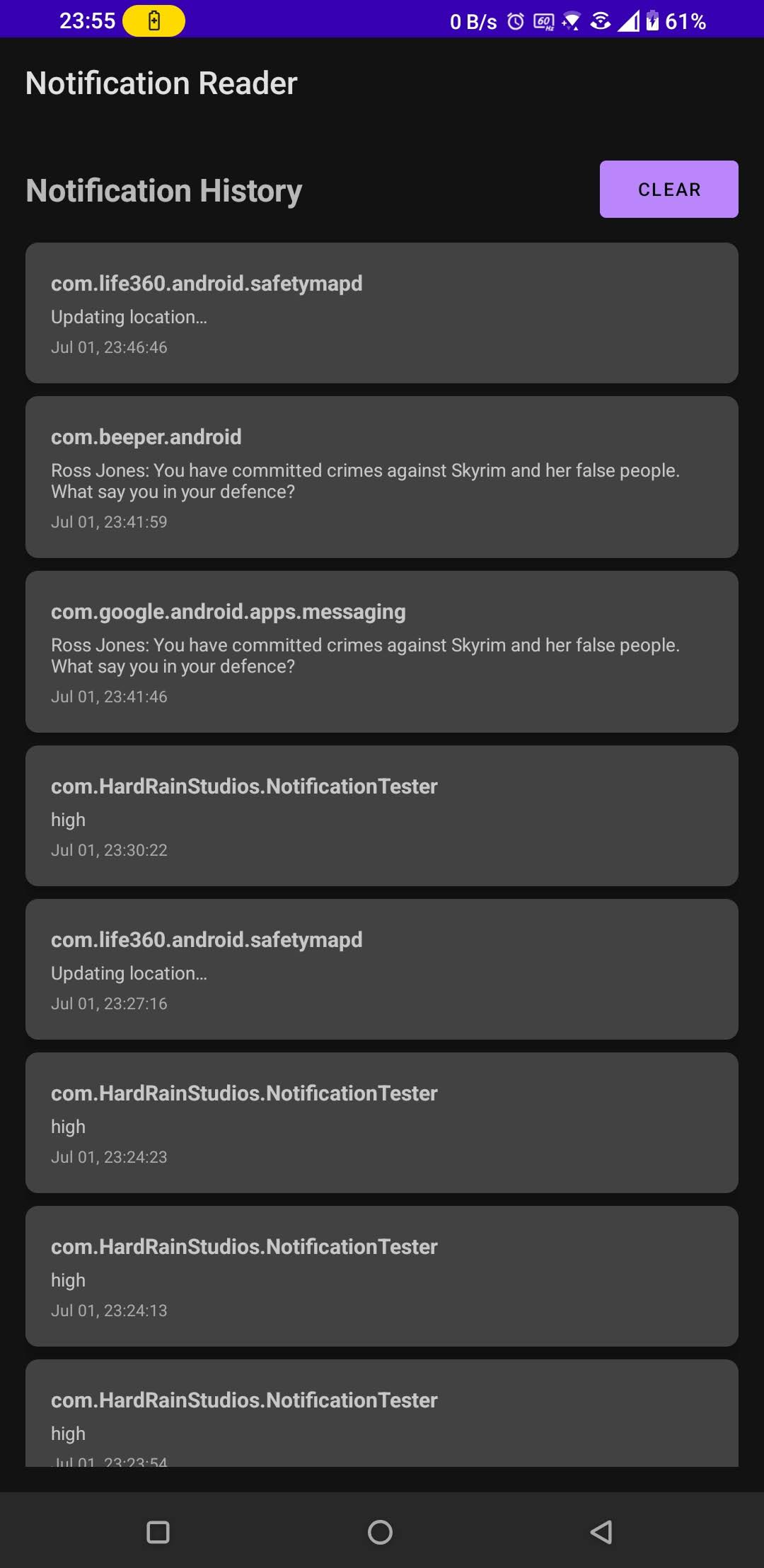
The first screenshot of SpeakThat!
1st July, 2025
SpeakThat had very humble beginnings. In fact, it wasn’t even called SpeakThat!
Simply titled “Notification Reader”, the app had no settings at all and would read every single notification without fail. The app’s UI was nothing more than a history of notifications.
I had been using a notification tester app to ensure the listener service was working.
This was as far as I thought I would get with AI-assisted programming.
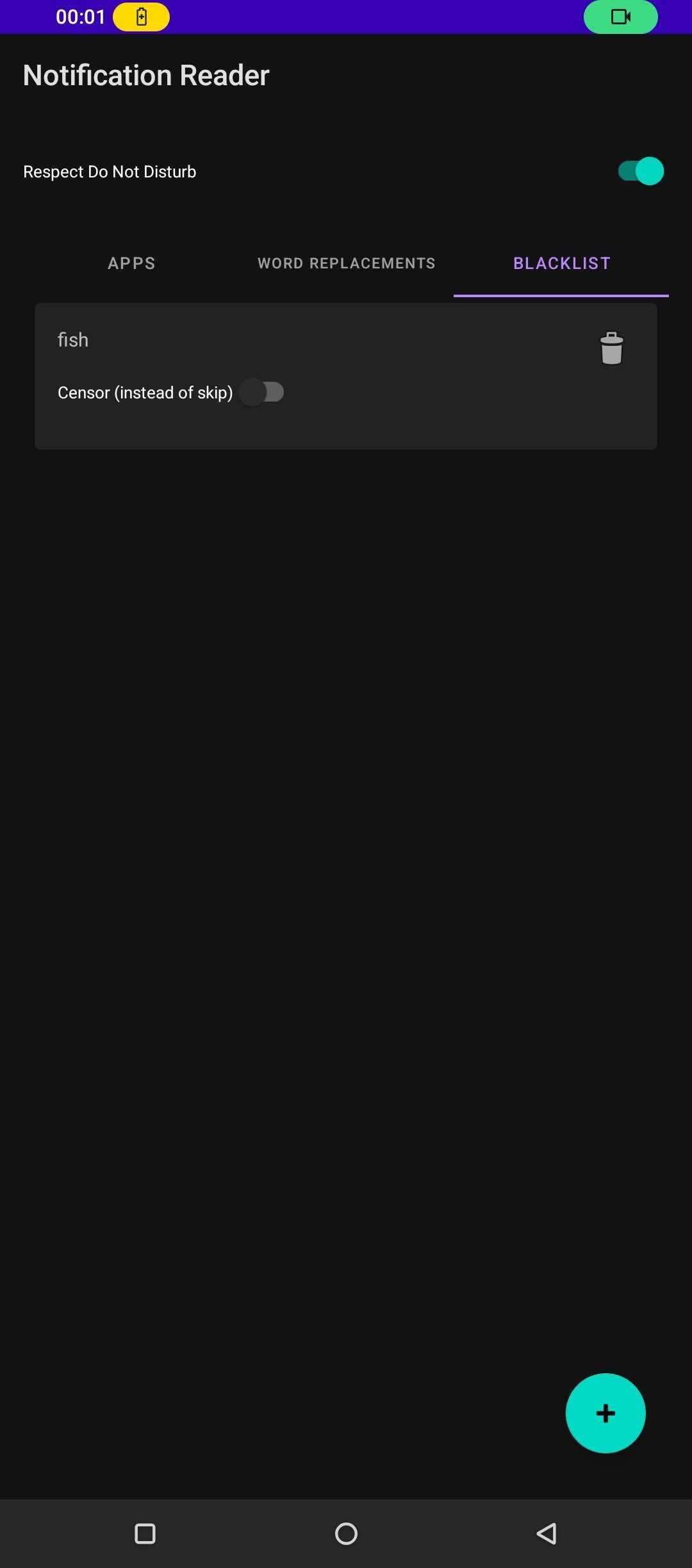
The first settings were added!
2nd July, 2025
(Coincidentally 4 days after Sameko Saba’s debut! Maybe that explains the fact that I was testing word filters with the word “fish”!)
The first three features were then added!
App blacklisting, Word blacklisting, and Word replacements.
Within an hour or two, I had reached this point. So I decided I would continue with this as an opportunity to perform some AI-based science.
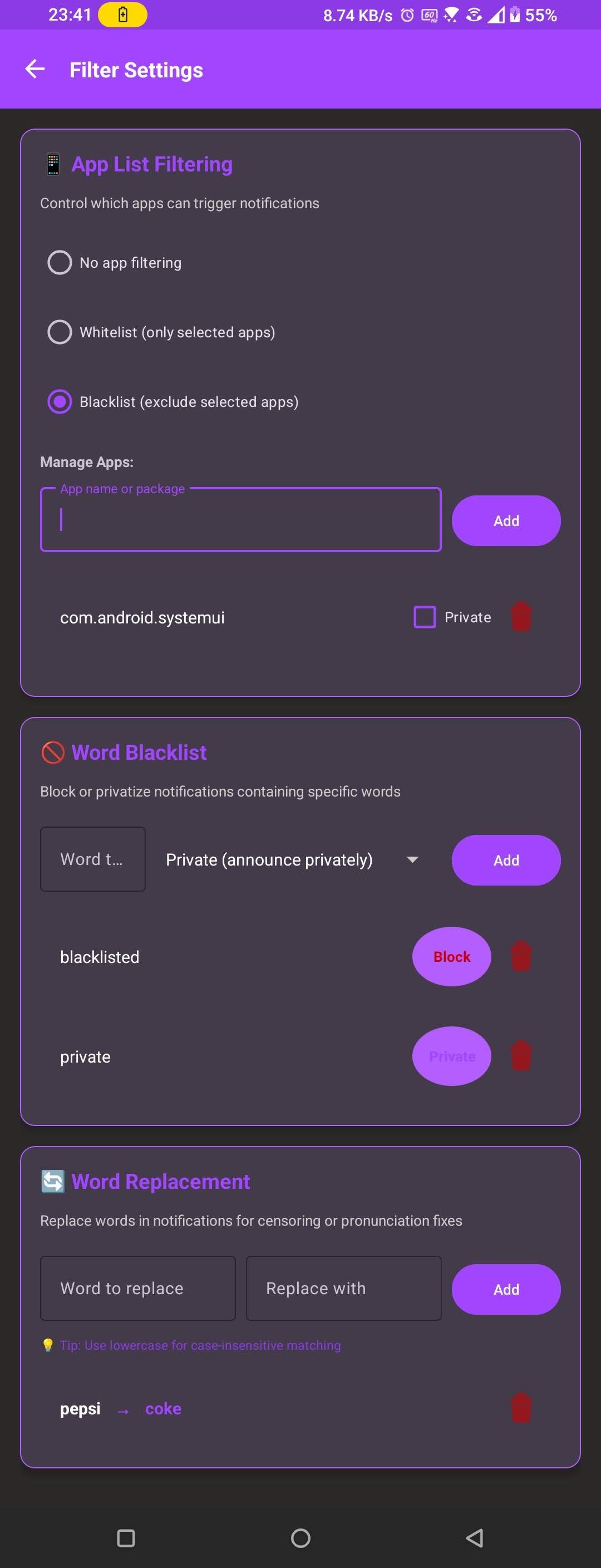
A very early version of SpeakThat!
2nd July, 2025
By the next night, SpeakThat had a characteristic user interface and some level of consistent branding. The purple theme was established and the card-style settings format made its first appearance.
Acknowledgments
As I mentioned in the Backstory, SpeakThat was mostly inspired by Touchless Notifications by Greg (DYNA Logix). Without his original app, I may have never fallen in love with notification readers and SpeakThat would simply not exist. Thank you ever so much for creating something truly ahead of its time. And I’m sorry it received such unfair punishment from Google!SpeakThat uses many icons from the Material Icons library, created by Google. These are available under the Apache 2.0 license, and make SpeakThat look much more professional than it has any right to be! So a huge thank you to the Material design teams!
The SpeakThat wordmark and general branding uses the Roboto and Roboto Condensed fonts. These are also from Google and are under the SIL Open Font License Version 1.1. Thanks for making a great typeface!
I should also thank the people making improvements in AI-assisted programming. SpeakThat simply couldn’t exist in its current form without this technology. It’s definitely not been perfect, but I’m amazed by what I’ve been able to do with it, even in its very early form. I’ve personally been using Cursor for my use, and they have improved their software by several orders of magnitude since I started using it. (Bonus: they even have a Linux version!)
Thanks also to the Android development teams for making an operating system capable of working for everyone. Your work is massively underappreciated!
Special thanks to my Mum, who supported the project from the very beginning and was willing to help me test it by trialling it on her phone! Thanks, Rusty!
I’d also like to thank my work colleagues, especially Connagh, who convinced me to try AI-assisted programming as I was very hesitant at first!
As this is the first time I had ever attempted anything like this, I ended up checking some of my basic notification reading and audio processing code to that of Voice Notify, created by Pilot51. I didn’t take any code directly, but since a lot of users were telling me certain things were working with Voice Notify but not with SpeakThat, its publicly-accessible code was incredibly helpful in making sure I wasn’t taking the wrong path. So massive thanks to Pilot51!
Thank you to all of the contributors, of which there are far too many to list at this point. But whether you contributed translations, code, donations, or even just constructive criticism, thank you so much. You shaped SpeakThat into something that truly exists to help people!
SpeakThat! & AI Usage
As the world heavily pivots towards artificial intelligence, I believe transparency with how work was created is more important than ever before.
SpeakThat’s code heavily makes use of AI-assisted programming. While I do my best to vet code used in the project and of course test new versions of the app on both my own devices as well as emulated devices before any of it goes public, I myself am not fluent in programming and development, and so there always exists the possibility for errors and faults to slip through into release. As you should expect, I take full responsibility for these mistakes and ask for your understanding as I work through them. If you are more talented than me (admittedly not a huge achievement!), please help the project by contributing to its source code while documenting your changes! If you’re not a programmer, you can still help the project by reporting bugs you find in the app.
I should state, however, that absolutely zero graphical work used by/for SpeakThat was generated by artificial intelligence. All visuals (Including logos, banners, and header images, and the project’s website) are all my own work, created using manual tools in Figma.
SpeakThat’s documentation was also written by myself, using LibreOffice Writer.
That said, I have used artificial intelligence to refine my wording in some areas for better clarity (and because I’m not all that great with technical explanations).
I greatly value the human experience of creation and thus only use AI as assistive tool, making sure my usage is both ethical and transparent. It does not run the project or make executive decisions.
Legalities
SpeakThat! is free and open-source software, released under the GNU GPL v3.0, a copyleft license that ensures modified and redistributed versions remain free and properly attributed.
This license allows you to download, modify, and redistribute SpeakThat, provided that any redistributed or modified versions remain under the same license and retain the original copyright notices.
As SpeakThat is a registered trademark, any derivatives should be rebranded to prevent confusion with the official project. This is to protect the original work from theft, and to protect users from installing fake or dangerous versions of SpeakThat which may have hidden unwanted code. Unfortunately, FOSS projects are often targeted by attackers to exploit user’s existing trust. SpeakThat’s core functionality requires access to some invasive permissions. So this is a precaution to counter such incidents from occurring, or private notification content falling into the wrong hands.
Contact me for any questions!
SpeakThat! Copyright © Mitchell Bell
SPEAKTHAT is a registered trademark of Mitchell Bell